

Nelx Secure Document Storage includes shortcodes for showing protected files on WordPress pages, posts, listing templates and user profiles. The shortcodes work without Elementor or JetEngine.
A shortcode does not make a private file public. Logged-in users see only the documents they are authorized to access, and the server checks permission again when a file is opened or downloaded.
Open the Shortcode Builder #
Go to Nelx Studio → Secure Documents Storage → Integrations → Shortcode Builder.
- Click Create New Shortcode below the existing shortcode configurations.
- Choose Single secure file or Secure files.
- Select the source: an attachment ID, a field/meta key, or the user’s authorized file library.
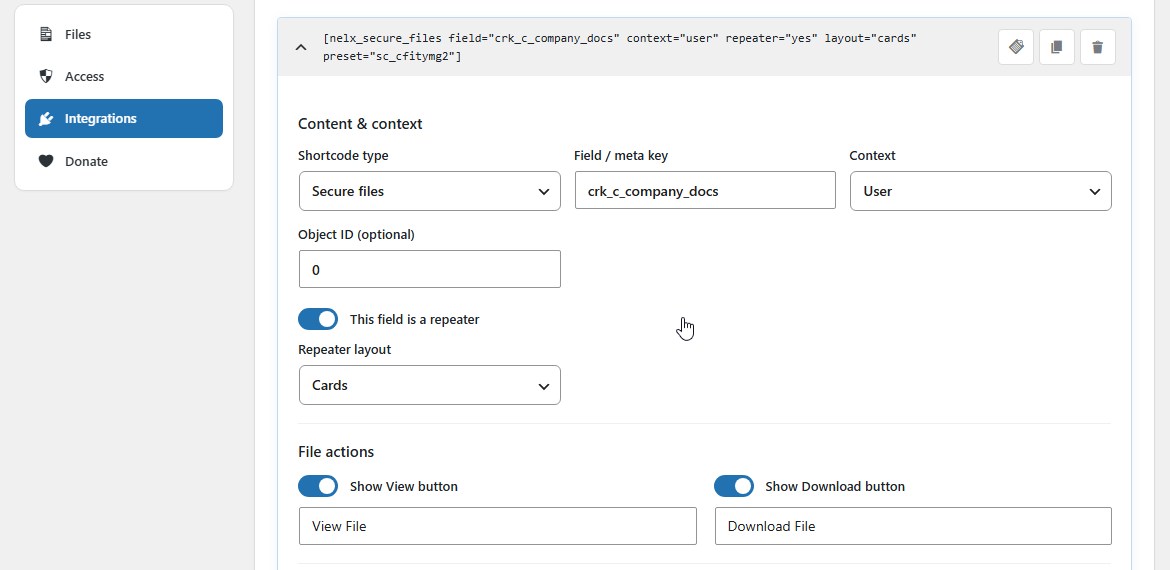
- Configure the context, repeater setting, layout and actions as appropriate.
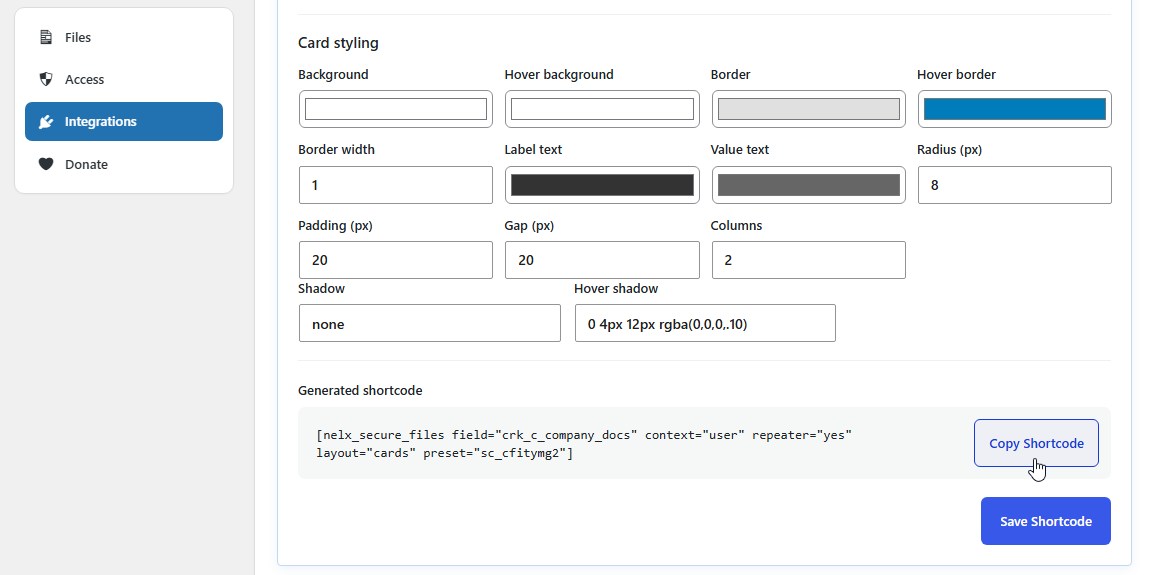
- Adjust button, card or table styling.
- Click Save Shortcode.
- Copy the generated shortcode from the card header or its expanded configuration.
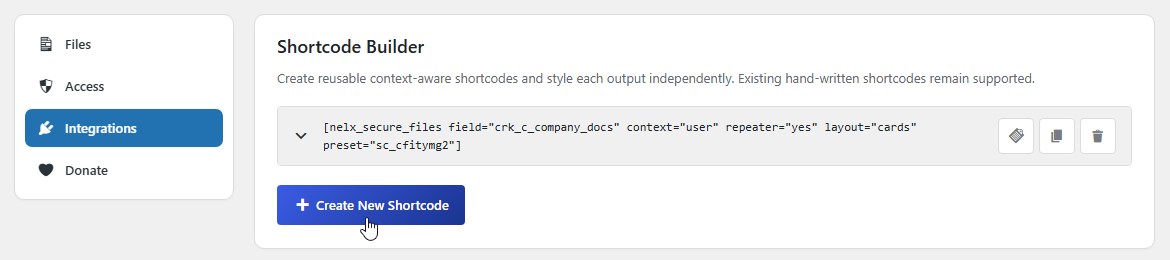
Each configuration is shown in a collapsible card. The header includes Copy, Duplicate and Delete actions. Saved presets allow two shortcodes using the same field to have different colours, layouts or button settings.
Content and Context Controls #
| Control | Purpose |
|---|---|
| Shortcode type | Single secure file or secure files |
| Attachment ID | A specific WordPress attachment, used when not reading a field |
| Field / meta key | A post, user or supported listing field containing attachment data |
| Context | Auto, Post, User or Current user |
| Object ID (optional) | A specific post or user, when the selected context uses one |
| This field is a repeater | Treat the field as repeatable rows |
| Repeater layout | Cards or Table |
| Files per page | Page size for the generic authorized-file library (1–100) |
Auto first uses the active JetEngine listing object when available, then falls back to relevant WordPress post or queried-user context. Current user uses the logged-in user’s metadata. Post and User can use an explicit object ID.
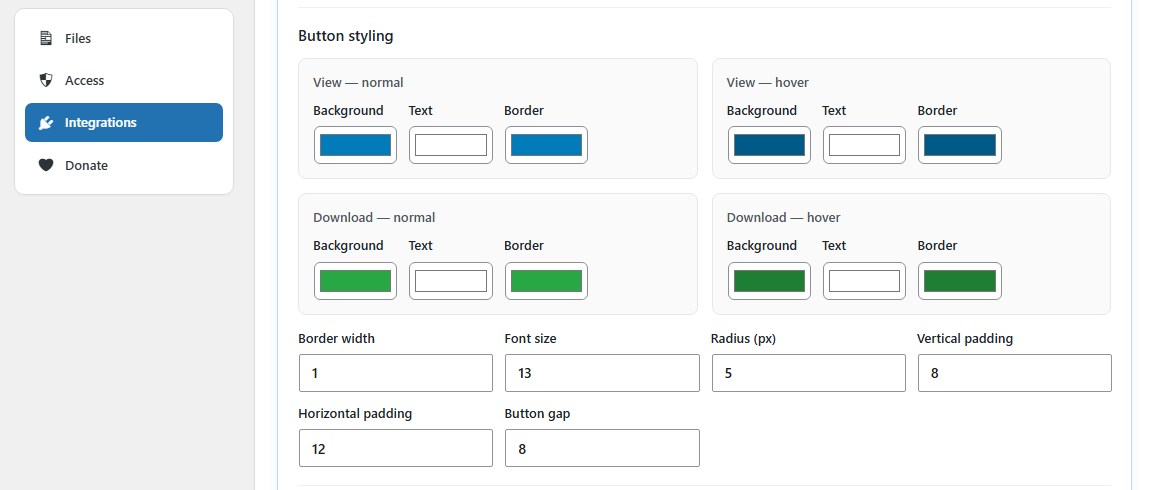
Button and Layout Styling #
The builder supports:
- Show/hide View and Download buttons and edit their labels.
- Separate normal/hover text, background and border colours for both actions.
- Button border width, font size, radius, padding and gap.
- Card backgrounds, hover states, borders, shadows, radius, padding, spacing and columns.
- Table header/background, row hover, text colours, borders, font sizes, cell padding and radius.
Styling is scoped to the saved preset so one shortcode does not globally restyle another.
Common Shortcode Examples #
Display One Secure Attachment #
[nelx_secure_file id="123"]Replace 123 with the WordPress attachment ID of an already-secured file.
List the Current User’s Accessible Files #
[nelx_secure_files]This produces a searchable frontend table with authorized files, file type, date, size and actions. The default page size is 20.
[nelx_secure_files per_page="20"]You may specify a page size from 1 to 100. The frontend library is separate from the admin DataTables page-length selector.
Display a Post or Listing Media Field #
[nelx_secure_file field="document"]Inside a listing, document is resolved for the current item rather than being fixed to one attachment ID. Replace the key with the real field name.
Display a Repeater as Cards #
[nelx_secure_files field="qualifications" repeater="yes" layout="cards"]Use layout="table" for a table instead. Repeater rows can include ordinary text values and secure attachment buttons.
Display a User Field #
[nelx_secure_file field="passport" context="current_user"]To use a particular user profile, specify user context and object ID:
[nelx_secure_file field="passport" context="user" object_id="42"]Display a Particular Post’s Field #
[nelx_secure_file field="document" context="post" object_id="42"]Use a Saved Style Preset #
[nelx_secure_files field="qualifications" context="user" repeater="yes" layout="table" preset="sc_example1"]The preset ID above is illustrative; copy the actual generated shortcode from the Shortcode Builder. Do not manually invent a preset identifier. Saved presets store both configuration and styles in the WordPress database.
Optional Hand-Written Attributes #
| Attribute | Supported values or purpose |
|---|---|
id | Secured attachment ID for single-file output |
field | Field/meta key for contextual output |
context | auto, post, user, current_user |
object_id | Explicit post/user ID |
repeater | auto, yes, no in hand-written shortcodes |
layout | cards or table for a repeater |
show_view | yes or no |
show_download | yes or no |
view_text, download_text | Action labels |
per_page | 1–100 for the authorized-file library |
preset | ID of a saved Shortcode Builder configuration |
For example:
[nelx_secure_file field="certificate" show_view="no" download_text="Get Certificate"]A hand-written shortcode remains supported, but a saved preset is preferable when you need detailed styling.
Supported Attachment Values #
The field renderer can handle attachment IDs, ID lists and common ID/URL array or JSON formats. For repeaters, it can read rows containing file fields and display the other row values alongside protected actions.
A field must actually contain a recognizable WordPress attachment reference; the shortcode cannot resolve a filename or arbitrary public URL into a secure attachment.
Add a Shortcode to a Page #
In the Block Editor, use a Shortcode block. In Classic Editor or a page builder, paste the code into the editor’s shortcode-compatible element. For dynamic listing output, place it inside the correct listing item or profile context.
Exclude pages showing private file information from shared full-page caches. The plugin requests private/no-cache handling, but an upstream cache might serve a page before WordPress applies those headers.
If Nothing Appears #
Confirm the field key, context, object ID, stored attachment value and the current user’s access. Also check that the file is actually secured and that a saved preset still exists. A missing preset can cause its saved styling to fall back to the visible shortcode attributes and defaults.
For JetEngine-specific setup, see JetEngine and Dynamic-Content Integrations.


