

Nelx Secure Document Storage works with JetEngine’s Dynamic Field output and provides context-aware shortcodes for WordPress post/user fields, JetEngine listings and supported CCT listing values.
JetEngine is optional. Use the universal shortcode approach when your site uses another page builder or a standard WordPress template.
Using the Secure File Links Callback #
When JetEngine is active, the plugin registers a Dynamic Field callback called Secure File Links.
In your JetEngine listing/template:
- Add a Dynamic Field for a field that stores a WordPress attachment reference.
- Select the correct field source and meta key.
- Enable the Dynamic Field’s callback/filter option.
- Select Secure File Links.
- Set the View/Download options and, if applicable, the repeater settings.
- Save the template and test with a user allowed to access the attachment.
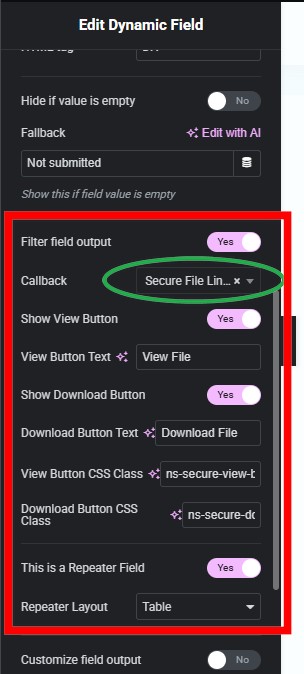
The callback supports the following controls:
| Control | What it changes |
|---|---|
| Show View Button | Whether View is rendered |
| View Button Text | Label on the View action |
| Show Download Button | Whether Download is rendered |
| Download Button Text | Label on the Download action |
| View Button CSS Class | Class for the View link |
| Download Button CSS Class | Class for the Download link |
| This is a Repeater Field | Whether the field contains repeater rows |
| Repeater Layout | Table or Cards |
The callback reuses the plugin’s protected file links. It does not create public media URLs.
Elementor Styling Controls #
When Elementor is used with the JetEngine Dynamic Field widget, the plugin retains its existing Elementor styling sections for the relevant secure-file buttons, repeater tables and cards.
These widget-specific controls are separate from the Shortcode Builder, which stores its own per-preset styling. If you choose the shortcode approach, configure its styles in Integrations rather than expecting the widget’s Elementor Style tab to govern the shortcode.
Usage #
Showing Secure Files in JetEngine Listings:
Add a Dynamic Field widget to your listing template.
For normal fields:
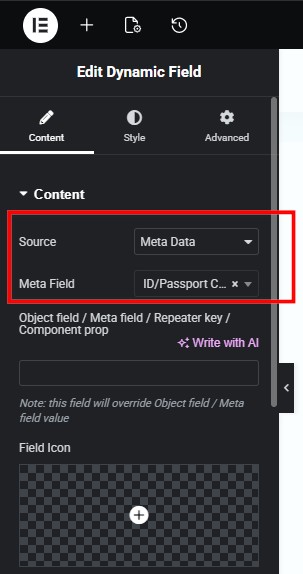
Source – Meta Data
Meta Field – Select your media field from the dropdown.
Scroll down and toggle filter field output switcher on. Select Secure File Links in the callback dropdown. That’s it!
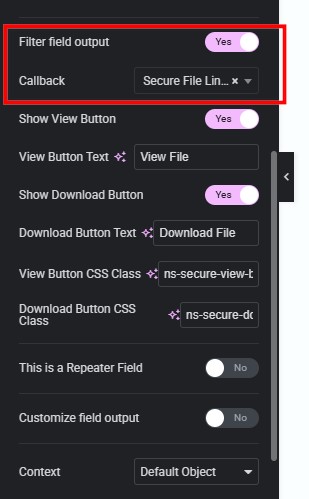
For repeater fields:
The steps are almost similar to those of normal fields, but with a slight difference.
Source – Meta Data
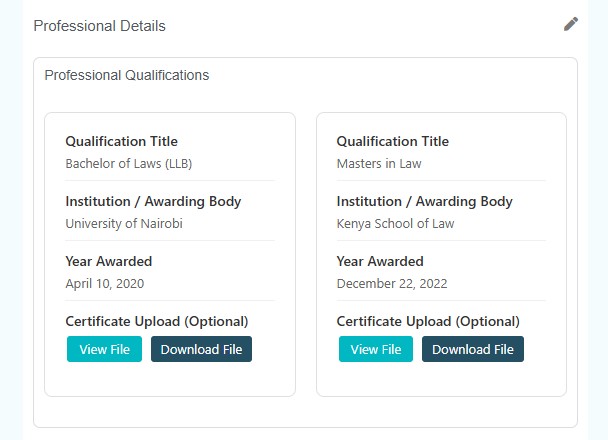
Meta Field – Leave empty and instead, add your repeater field name in the object field/meta field/repeater key/component prop input field. See screenshot below.
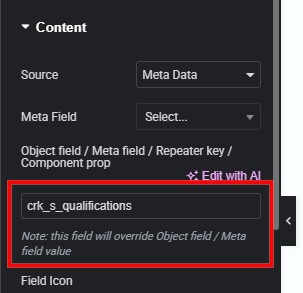
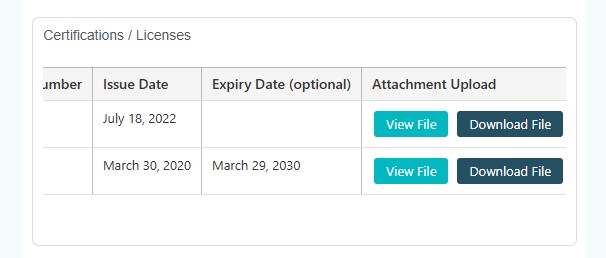
Scroll down and toggle filter field output switcher on. Select Secure File Links in the callback dropdown. Toggle this is a repeater field switcher and choose your repeater layout (table/cards).
Styling Buttons, Tables, and Cards
Buttons:
Button style controls are available for both normal and repeater fields the moment you choose Secure File Links callback.
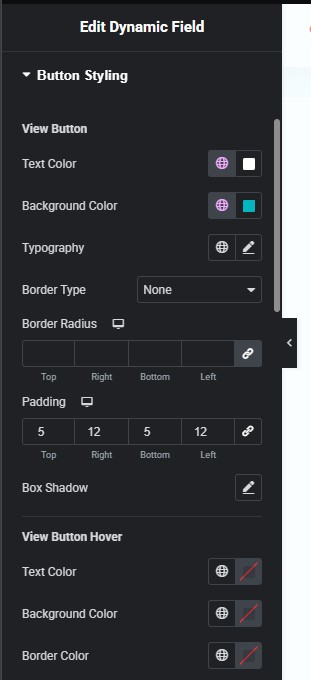
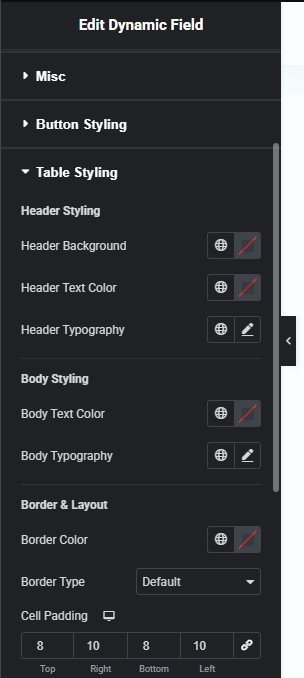
Table:
Table styling controls are available conditionally, that is, if you choose your repeater layout as table.
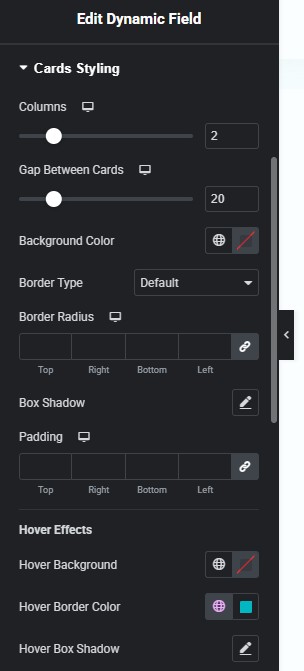
Cards:
Cards styling controls are also available if you set your repeater layout to cards.
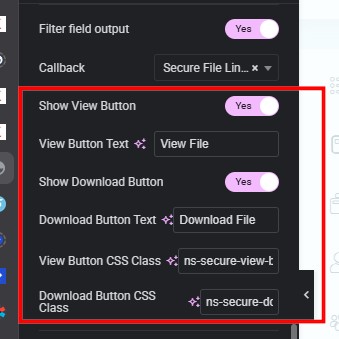
Adjust styles for buttons, cards, or tables as desired.
You can make other button adjustments from here such as hidding view/download buttons, change button text, etc.
Use a Shortcode Instead of the Callback #
For a normal media field attached to the current listing item:
[nelx_secure_file field="company_document"]For a repeater:
[nelx_secure_files field="qualifications" repeater="yes" layout="cards"]You can place these in a WordPress Shortcode block or another builder’s shortcode element. The field key is the stored meta key, not the label shown to an editor.
Post Listings #
Within a JetEngine post listing, context="auto" normally resolves the active listing item. Use context="post" when you want to make the intended context explicit.
[nelx_secure_file field="registration_document" context="post"]If no usable listing object exists, the renderer falls back to the WordPress post context. An explicit object_id can be used for a fixed post, but avoid doing that in reusable listing cards because every card would then refer to the same post.
User Listings and Profile Pages #
For a current user profile:
[nelx_secure_file field="passport" context="current_user"]For JetEngine user listings, use:
[nelx_secure_files field="qualifications" context="user" repeater="yes" layout="table"]Here context="user" can use the current JetEngine user object or the queried WordPress user. Outside a matching user context, it may fall back to the logged-in user. Use an explicit object_id only if you intend to display a fixed user’s field.
Important: selecting someone else’s profile context does not grant access to that person’s protected attachments. The secure-file permission check still applies.
JetEngine CCT Values #
If JetEngine supplies a current CCT listing object, the renderer can read a matching field/property from that object. This is a display integration, not an automatic grant of permission for the referenced attachment.
Confirm that the CCT field contains a recognizable attachment ID or supported ID-based value. Also confirm that the user is permitted to access that file.
Repeater Labels and Values #
Repeater layouts can display ordinary row values alongside file actions. Where JetEngine field definitions are available, the renderer attempts to use their configured labels. Otherwise, it converts the stored field keys into readable labels.
For example, a repeater can contain a document type, description, and media value; the selected Cards or Table layout determines how these appear.
Common Issues #
If a listing displays the same file in every item, check for a hard-coded attachment ID or object_id. If nothing appears, check the field key, selected source, whether the repeater flag matches the data, and whether the user has file access.
If View/Download controls appear but access is denied, the callback is not the authorization boundary. Review the user’s role, file ownership, form-level grant or scoped integration policy.
See Secure Document Display and Shortcodes and User Roles and Permission Management.


