

Appearance
WhatsApp DirectStart a Project
Frontend Manager for Crocoblock JetAppointments
Version 1.1.10 Requires JetAppointments $0 / Free Add-on

Run appointments from the frontend.

Give providers and clients a practical appointment workspace without sending them into WordPress admin. Manage schedules, browse bookings, reschedule appointments, connect Google Meet, send reminders and keep the full workflow close to the people using it.

WordPress 6.2+PHP 7.4+Elementor widgets + shortcodes
Your Appointments
CopyCSVExcelPrintPDF
IDServiceClientAppointment DateStart TimeEnd TimeAction
100ConsultationAmina K.Oct 0810:3011:15↗✓×i
101OnboardingBrian O.Oct 0814:0014:45↗✓×i
102Review SessionCarol W.Oct 0909:0009:45↗✓×i
Native appointment workspaceTables, cards & monthly calendar
Provider schedule controlHours, days off & custom days
Google Meet integrationProvider account connection
Email & reminder automationAppointment lifecycle messaging
Built around JetAppointments

Not another booking engine.

JetAppointments remains the booking system. Nelx adds the frontend operations layer that providers and clients actually work with after a booking exists.

Native listings without a Query Builder dependency

Render staff/provider and client appointment tables or dashboard cards directly, with search, pagination, exports and appointment actions.

Appointment actions stay close to the appointment

Confirm, reject or cancel, reschedule and open appointment information through frontend controls and inline modals.

Providers manage their own availability

Working hours, days off and custom working days are editable on the frontend instead of becoming an administrator task.

Appointment workspace

List when you need detail. Calendar when you need context.

Appointment listings are built for day-to-day provider and client use: searchable tables, exports, list/calendar switching and action controls all sit in the same frontend experience.
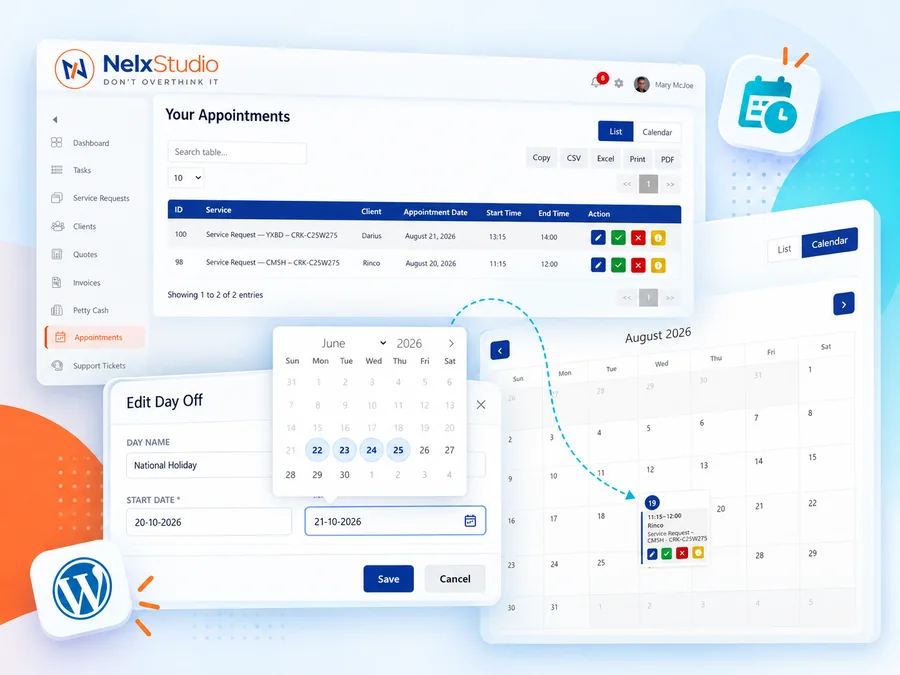
Search and paginate appointment data without building a custom JetEngine listing.
Export visible data to Copy, CSV, Excel, Print or PDF from the table interface.
Switch to a monthly calendar for fast booking-density and date context.
Reuse the same appointment action controls inside the native listings.
Nelx JetAppointments frontend appointment workspace showing appointment list, calendar and date controls
Two frontend experiences

The right controls for the right person.

Provider and client views are separate by design, so you are not exposing staff-only actions to the wrong side of the appointment.

Staff / Provider

Operate the appointment

  • Table and grid appointment views
  • Confirm or reject appointments
  • Collision-safe rescheduling
  • View configurable appointment information
  • Update appointment payment status where configured
  • Manage schedule and Google Meet settings
Client

Manage their own booking

  • Table and grid appointment views
  • Reschedule an existing booking
  • Cancel when the appointment can no longer proceed
  • Open appointment details from the frontend
  • See appointment times in the appropriate client-local context
  • Receive lifecycle emails and configured reminders
Customize Your ScheduleProvider availability controls
Use Custom Schedule
00:45
00:30
00:15
00:00
When users can book appointmentsAny date in the futureLimited range from current date

Work Hours

Monday09:00 — 17:00×20:00 — 22:00×+ Add slot
Tuesday08:00 — 17:00×+ Add slot
Wednesday08:00 — 17:00×+ Add slot
Thursday08:00 — 17:00×+ Add slot
Friday10:00 — 17:00×+ Add slot
SaturdayNo working hours×+ Add slot

Days Off

National Holiday — 20-10-2026 — 21-10-2026 · ✎ ×
Exams Days — 22-06-2026 — 25-06-2026 · ✎ ×
Add Days

Working Days

Override only days added below

Add dates when your availability is different from your regular weekly hours.

Field Work — 06-07-2026 — 10-07-2026 · 08:00–10:00, 18:00–20:00 · ✎ ×
Special Friday — 01-07-2026 — 03-07-2026 · 11:00–14:00 · ✎ ×
Add Days
Schedule editor

Availability goes well beyond weekly opening hours.

The frontend editor exposes the practical scheduling controls providers need without asking an administrator to update JetAppointments for them.

Enable or disable a provider-specific custom schedule.
Set appointment duration and locked time before booking.
Configure buffer time before and after appointments.
Allow any future date or restrict how far ahead users can book.
Add multiple time slots to the same weekday.
Create named date-range Days Off and edit them later.
Choose how Working Days interact with the normal weekly schedule.
Add custom working-date ranges with one or multiple time slots.
Appointment lifecycle

One booking. A complete operational path.

The addon stays involved after a booking is created, connecting schedule control, appointment actions, communications and meeting setup around the JetAppointments record.

Booking exists

JetAppointments remains the source appointment system.

Notify

Email events and optional Nelx in-app alerts keep people informed.

Manage

Confirm, cancel, inspect or reschedule from the frontend.

Meet

Connected providers can generate Google Meet links for online sessions.

Remind

Scheduled reminders can run through the configured automation/cron path.

Built into your WordPress stack

Use the tools you already build with.

Place the appointment experience with Elementor or shortcodes, connect provider calendars, and plug into the wider Nelx ecosystem where it adds value.

Elementor widgets

Schedule Editor, Staff/Client Appointments, action buttons and Google Meet settings can be placed visually inside your frontend dashboards.

Shortcodes

Use native shortcodes when a page is not built with Elementor, including appointment tables, grids, schedules and action controls.

Google Meet

Providers can connect their Google account from the frontend and use online-meeting links as part of appointment operations.

Email templates

Configure branded appointment emails for new bookings, confirmations, cancellations, reschedules and reminders.

Nelx Notification System

Optional in-app appointment alerts use the local Nelx notification service in v1.1.10—without the obsolete same-site notification REST/auth flow.

Frontend-first operations

Keep routine provider and client appointment management out of wp-admin while preserving JetAppointments underneath.

// Place the frontend experience where you need it
[nelx_schedule_editor]// provider schedule editor
[nelx_provider_action_buttons]// [LEGACY] provider actions: confirm, reject, reschedule and appointment info
[nelx_client_action_buttons]// [LEGACY] client actions: reschedule, cancel and appointment info
[nelx_staff_appointments]// native staff/provider appointments table
[nelx_client_appointments]// native client appointments table
[nelx_staff_appointments_grid]// native staff/provider dashboard appointment cards
[nelx_client_appointments_grid]// native client dashboard appointment cards
[nelx_google_meet_settings]// provider Google Meet settings page
Appointment information

Show the fields that matter.

The enhanced information modal can be configured around the appointment details your workflow actually needs, including status-oriented operational data.

Timezone handling

Keep appointment time meaningful.

Provider and client views account for timezone context so displayed appointment dates and times stay useful to the person looking at them.

Cron diagnostics

Know whether reminders can run.

Testing, file checks, CLI validation, crontab detection and manual confirmation help make reminder automation practical on shared hosting too.

Free addon

No second booking-system bill.

Nelx JetAppointments Addon extends the JetAppointments installation you already use. The current Nelx addon is available at no cost.

FREENelx JetAppointments Addon

Frontend management layer

$0

Use the current Nelx release without a separate paid Nelx license today.

Included in the addon

  • Staff/provider and client appointment tables
  • Dashboard appointment grids
  • Monthly appointment calendar view
  • Frontend schedule editor and appointment actions
  • Google Meet integration
  • Email templates and reminder automation
  • Elementor widgets and shortcodes
Get the free addon
Required dependency: Crocoblock JetAppointments Booking must already be installed and activated. Elementor is optional because the addon also provides shortcodes.
FAQs

Before you add it to your stack.

The important distinction is simple: JetAppointments handles bookings; Nelx makes the ongoing appointment workflow practical on the frontend.

Does this replace JetAppointments?
No. Nelx JetAppointments Addon is an extension and requires Crocoblock JetAppointments Booking to be installed and activated. It adds frontend management around the existing appointment system.
Do I need Elementor?
No. Elementor widgets are included, but the core frontend components are also available through shortcodes for non-Elementor layouts.
Can providers manage their own schedules?
Yes. The Schedule Editor is designed for provider-side frontend use and includes custom schedules, duration, locked time, pre/post buffers, booking-date limits, work hours, days off and custom working-day overrides.
What appointment actions are available?
Provider controls include confirmation/rejection, rescheduling and appointment information. Client controls include rescheduling, cancellation and appointment information. The native listings reuse those action controls.
Does it support Google Meet?
Yes. Providers can connect their Google account and use the frontend Google Meet settings flow for online appointment integration.
Is Nelx Notification System required?
Not for the core appointment-management experience. In v1.1.10, optional in-app appointment alerts use the local Nelx Notification System service when that system is available. Email appointment notifications and reminders remain part of the addon workflow.
Keep JetAppointments. Improve the workflow.

Move appointment operations to the frontend.

Give providers and clients the controls they need without rebuilding the booking system you already have.